CMSBuffet.com
Helping Our Clients Achieve Their Web Goals

How To Set Up Thunderbird Email
How to set up Thunderbird Mail?
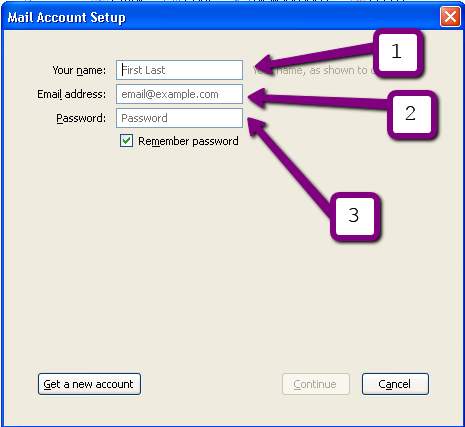
Mail account setup:
Enter
Your name
Email address
Password
Mail account Setup:
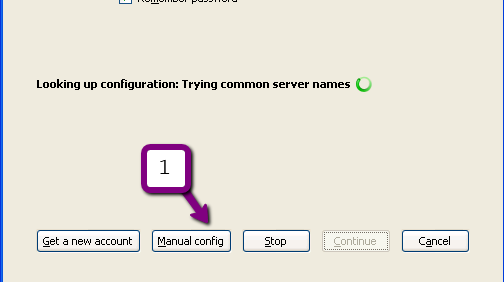
Thunderbird will try to connect to the mail server and fail!
This is what you will see
Go to "Tools"
"Account Settings"
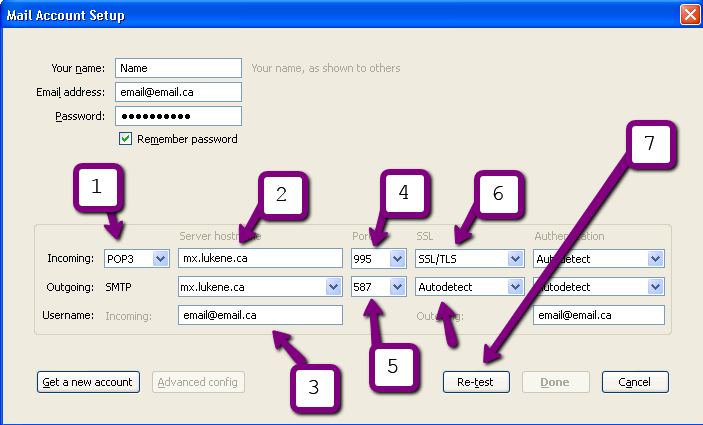
Pop 3 server is mail.cmsbuffet.com
User name, is what you got from the system administrator
Un-check "Use secure authentication"
Click "Outgoing Server (SMTP)"
Click "Edit"
Description "mail.cmsbuffet.com"
Server Name "mail.cmsbuffet.com"
Port 2525
Check "Use name and password"
User Name is the email address you got
Connection security "STARTTLS"
Click "OK"
Click "OK"
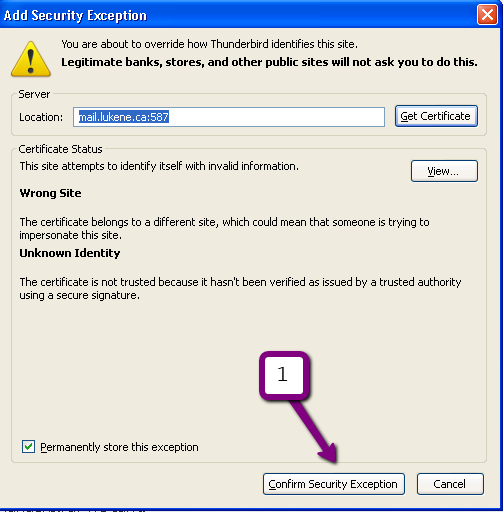
Click "Confirm Security Exception"
The first time you send / receive an email
The password prompt would "Pop"
Enter your password
Click "OK"

Recently Launched Websites

K9-Toronto.Com

K9 Toronto K9 Toronto brings the dog salon to Toronto dog owners, so your dog can get regular dog grooming in Toronto without the hassle. K9 Toronto professional dog grooming and dog walking services in Toronto take the stress out of these basic needs for both you and your pets.

Contact Us:

Phone: 647-477-2992
Email: info @ CmsBuffet.Com
Helping You Achieve Web Visibility.

Follow Us On Twitter